
Scroll Reverser
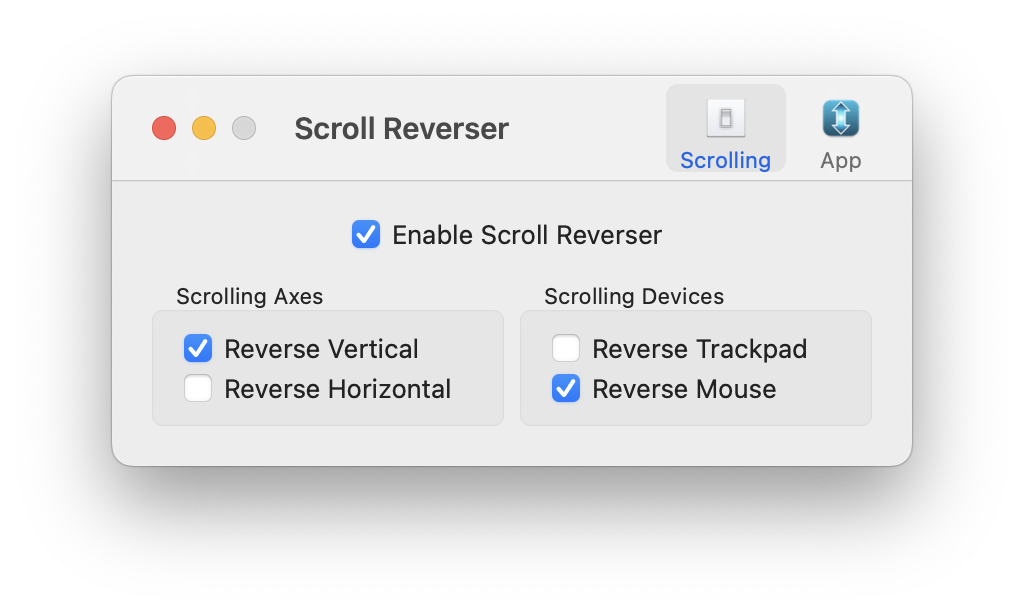
Scroll Reverser is a Mac app that reverses the direction of scrolling, with independent settings for trackpads and mice (including Magic Mouse).
brew install --cask scroll-reverser
For wheel mouse users, Scroll Reverser also includes a step size control: scroll a fixed amount with each click of the wheel, instead of macOS default “scroll acceleration”.
About Scroll Reverser
Scroll Reverser is free and open source under the Apache Licence 2.0, with source code on GitHub.
It is maintained by Nick Moore. To get in touch, contact support@pilotmoon.com. If you wish to make a voluntary donation you can do so via my Buy Me a Coffee page. Please also check out my other apps.

Usage, FAQ & Troubleshooting
Uninstall. Scroll Reverser is a self-contained app and does not install itself deeply into your system. To completely uninstall, simply quit the app and move it to Trash. You may also wish to delete ~/Library/Preferences/com.pilotmoon.scroll-reverser.plist.
Recommended settings. A common use case is to have natural scrolling for your trackpad and “classic” scrolling for your mouse. For this, enable natural scrolling in System Settings and configure Scroll Reverser with “Reverse trackpad” off and “Reverse mouse” on. Doing it the opposite way round will give you the scrolling you want but gestures may feel wrong.
Step size control. If Scroll Reverser detects non-continuous scrolling (typically from a wheel mouse), it will show a step size slider. The slider controls the number of lines scrolled with each step of the wheel. Set the slider all the way to the left to disable this feature and use the system default behaviour.
Can’t enable Scroll Reverser. If Scroll Reverser does not respond when you try to check “Enable Scroll Reverser”, please try the following:
- Quit Scroll Reverser.
- Ensure Scroll Reverser is located in your Applications folder.
- Go to System Preferences → Security & Privacy → Privacy → Accessibility.
- Use the “–” button to remove Scroll Reverser from the list; then add back with “+”.
- Now start Scroll Reverser. It ought to work this time.
Scroll Reverser sees my trackpad as a mouse. There’s a system setting in Accessibility that lets you double-tap with three fingers to zoom. Unfortunately, when it is turned on, it stops Scroll Reverser working properly. Look for the checkbox: Accessibility → Zoom → Advanced → Controls → Use trackpad gesture to zoom, and make sure is is not checked (more information here).
Also, if you have an older Mac without a multi-touch trackpad (late 2007 and earlier) then Scroll Reverser will see your trackpad as a mouse. This also affects some third party external trackpads.
Can you make it reverse swipe gestures too? No, this is not possible. However, swipe direction respects the “Scroll Direction: Natural” setting in System Preferences. Set that to your liking, then use Scroll Reverser to adjust scrolling with respect to that base setting.
Scroll Reverser doesn’t work in iPhone Mirroring or in Calendar app. iPhone Mirroring and Calendar use a custom scrolling interface based on gestures, not scroll events. Scroll Reverser can’t reverse gestures.
I am controlling a machine via remote desktop, and Scroll Reverser is running on both the local and remote machine. Anything I can do to make it work nicely? Run this command at terminal on the remote machine: defaults write com.pilotmoon.scroll-reverser ReverseOnlyRawInput -bool YES then quit and restart Scroll Reverser.
Translations
Thanks to volunteer translators, Scroll Reverser’s user interface available in the following languages:
Chinese Simplified, Chinese Traditional, Czech, Danish, Dutch, English, French, German, Greek, Hebrew, Hungarian,
Italian, Japanese, Korean, Nepali, Norwegian Bokmål, Polish,
Brazilian Portuguese, Romanian, Russian, Slovak, Spanish, Swedish, Turkish, Ukrainian, Vietnamese.
You are invited to contribute translations in your own language via Pilotmoon Apps project on CrowdIn. If your language does not exist in the project, send me an email so I can add it.
Alternatives
There a number of alternative projects with overlapping functionality that you might want to check out:
Older Version Downloads
For macOS 10.12.6 or later (Intel and Apple silicon):
Download Scroll Reverser 1.8.2 (Mar 9, 2022)
For Mac OS X 10.7 or later (Intel):
Download Scroll Reverser 1.7.6 (May 11, 2017)
For Mac OS X 10.4 or later (PowerPC, Intel 32-bit and Intel 64-bit):
Download Scroll Reverser 1.5.1 (Mar 12, 2012)
Version History
1.9 (Jun 21, 2024)
- Fixed issues with the Start at login setting not working correctly on recent versions of macOS.
- New app icon in “Big Sur” style.
- Re-launching the app while it is running now shows the prefs window instead of unhiding the status bar icon.
- Only show the step size setting if a scroll wheel is actually used.
- Updates and corrections to the Czech, Slovak, Spanish and Turkish translations. Thanks to community contributors.
- Updated Sparkle (auto-update framework) to latest version.
- Minimum system requirement is now macOS 13.5 (Ventura).
1.8.2 (Mar 9, 2022)
- Fixed broken scrolling with Trackpad and Magic Mouse in Safari, on macOS Monterey 12.2 and Big Sur 11.6.2. Thanks to Jiahao for the fix.
- Adds Czech, Danish, Hungarian and Vietnamese translations, plus updates to other languages. Thanks to all the translators.
1.8.1 (Jul 6, 2021)
- Added step size adjustment for scroll wheels. This lets you increase the amount of scroll when single stepping the wheel. (It is similar to the DiscreteScroll app.)
- Added French, Hebrew, Nepali, Turkish and Ukranian translations and updated several other translations. Thanks to all those who contributed - too many names now to keep track of in the release notes.
1.8 (Dec 3, 2020)
- Updated for macOS 11.0 Big Sur.
- Universal app for both Intel and Apple M1 chip.
- Dark mode.
- New user interface in prefs prompts you when required permissions are missing (Accessibility and Input Monitoring).
- Fixed crashing due to missing Accessibility permission.
- Reimplemented Start at Login functionality to be more reliable now, I hope.
- Removed the “Reverse Tablet” option.
- The minimum system requirement is now macOS 10.12.6.
1.7.6 (May 11, 2017)
- Some internal changes to the way preferences are loaded. (As part of investigating Issue #38: Scroll reverser preferences randomly change.)
- Translation updates, including a new Norwegian translation (thanks, Patrick).
1.7.5 (Apr 24, 2017)
- Fix: Presence of Scroll Reverser triggering additional security dialogs (for example, in Keychain permissions dialogs);
- Fix: "Shake to locate cursor" not working with Trackpad while Scroll Reverser is running;
- Fix: Notification center getting stuck half-open while Scroll Reverser is running.
- Added Simplified Chinese (zh-CN) translation. (Thanks, Ruocheng Wang.)
- Added Dutch translation. (Thanks, Erik.)
1.7.4 (Nov 11, 2016)
- The relaunch-on-wake implementation is now more robust.
- A small correction to the Polish translation.
1.7.3 (Nov 7, 2016)
- Scroll Reverser now silently relaunches itself when your Mac wakes from sleep. (This is because of a problem where macOS sometimes stops sending gesture events to Scroll Reverser after awaking from sleep.)
- Added Hungarian and Polish translations. (Thanks, Léki and Artur.)
- Fixed a bug where, on unchecking "Show in menu bar", the "Icon Hidden" message would appear multiple times.
1.7.2 (May 26, 2015)
- Fixes for bug where Scroll Reverser would sometimes stop working, requiring app restart. (Now it should hopefully not stop working, and if it does you can just toggle Scroll Reverser off/on to reset it.)
- You can now right-click (or control-click) the menu bar icon to toggle Scroll Reverser on/off.
- New algorithm to (hopefully) distinguish more accurately between trackpad and mouse.
- Added a debug console to help with fault-finding. To show the debug window, option-click (⌥-click) the Scroll Reverser menu bar icon.
- Added Korean, Russian, Slovak and Traditional Chinese translations. (Thanks Josef, Byungkook Jang, Dmitry, and Johnny.)
1.7.1 (Jan 7, 2015)
- Fixed bug (introduced in v1.7) where Scroll Reverser would sometimes stop working after using it for a while.
- Added Romanian translation. (Thanks, Gabriel.)
1.7 (Dec 18, 2014)
- Brand new preferences window to replace the clunky old menu.
- Important fixes for compatibility with the upcoming Yosemite update 10.10.2.
- Adds AppleScript support for turning Scroll Reverser on and off.
- Now treats a Wacom mouse's scrolling as coming from a mouse, rather than a tablet.
- Gave the app icon a freshen up.
- Localized in Brazilian Portuguese, German, Greek, Italian, and Japanese. (Thanks, Humberto, Peter, Nikos, Vincenzo and Fu-sen.)
1.6.1 (Sep 25, 2014)
- Updated for OS X Yosemite. (Specifically, the menu bar icon now supports Dark Mode.)
1.6 (May 21, 2013)
- Updated the status icon for retina displays.
- Better accuracy detecting traditional wheel mice from trackpads. (No change to Magic and Mighty mouse detection.)
- Added the option to automatically check for updates.
- Fix minor bug which casused a console warning about 'scrollPhase is deprecated...'.
- Minimum system requirerement is now OS X 10.7 Lion.
1.5.1 (Mar 12, 2012)
- Signed with a Developer ID for OS X 10.8 Gatekeeper.
1.5 (Feb 23, 2012)
- Now works with OS X 10.4 Tiger.
- More reliable detection between mouse and trackpad.
- Fixed a bug that led to high memory usage.
- Added a welcome window that appears on the first run.
- Added German localization. (Thanks, Peter.)
1.4.4 (Sep 29, 2011)
- Fixed a memory leak.
- Fixed a problem with the Italian localization.
- Added Romanian localization. (Thanks, Gabriel.)
1.4.3 (Sep 9, 2011)
- Added French localization. (Thanks, Marcel and E.)
1.4.2 (Aug 18, 2011)
- Changed default on Lion to not reverse horizontal scrolling.
- Added Spanish localization. (Thanks, Pedro.)
1.4.1 (Aug 18, 2011)
- Restored PowerPC and 32-bit Intel support.
- Better Wacom tablet detection.
1.4 (Aug 11, 2011)
- Added independent settings for horizontal and vertical scrolling.
- Added independent settings for scrolling with trackpad, mouse and Wacom tablet.
- Fixed a Firefox compatibility problem.
- Dropped PowerPC and Intel 32-bit support (by mistake).
- Added Italian localization. (Thanks, Vincenzo.)
1.3 (Jun 28, 2011)
- Added PowerPC support.
- Added Greek localization. (Thanks, ecrisis.)
1.2 (Apr 11, 2011)
- Added option to hide the menu bar icon.
- Added Brazilian Portuguese localization. (Thanks, Humberto.)
1.1 (Apr 1, 2011)
- Bugfixes.
1.0 (Mar 8, 2011)
- Initial release.
 Pilotmoon Software