
 DwellClick User Guide
Floating Control Panel
The floating control panel lets you use all the features of DwellClick without having to press keys or perform physical clicks or touches. It is especially suitable for use with hands-free pointing devices.
You can configure the appearance and behaviour of the floating panel in Preferences → Panel.
Using the floating control panel
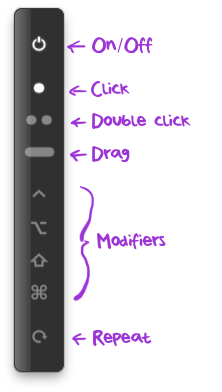
The on/off button lets you turn DwellClick on and off.
When off, you can turn DwellClick on by hovering the mouse pointer over the on/off button for 1 second.
The click, double-click and drag buttons let you select the next click or drag action.
The modifier buttons ⌃, ⌥, ⇧, ⌘ let you choose a modifier key to go with the next click.
The repeat button lets you repeat the selected click and modifier again, instead of always reverting to an unmodified single-click.
When the repeat button is on, the symbol above the mouse pointer turns from grey to white.